

Telematics data integration workflow: a UK fleet guide

A telematics data integration workflow is the structured process of connecting vehicle data sources, normalising their outputs, and routing the results into the business systems that drive fleet decisions. For UK fleet managers running HGVs, vans, or mixed assets, this process is the difference between raw GPS coordinates and genuinely useful intelligence on driver behaviour, fuel consumption, and DVSA compliance. The industry term for the underlying architecture is fleet data pipeline, and understanding how it works is the first step toward getting real value from your telematics investment. Done well, a telematics data integration workflow replaces manual reporting with automated triggers, turning your platform into an operational engine rather than a passive monitoring tool.
What does a telematics data integration workflow actually require?
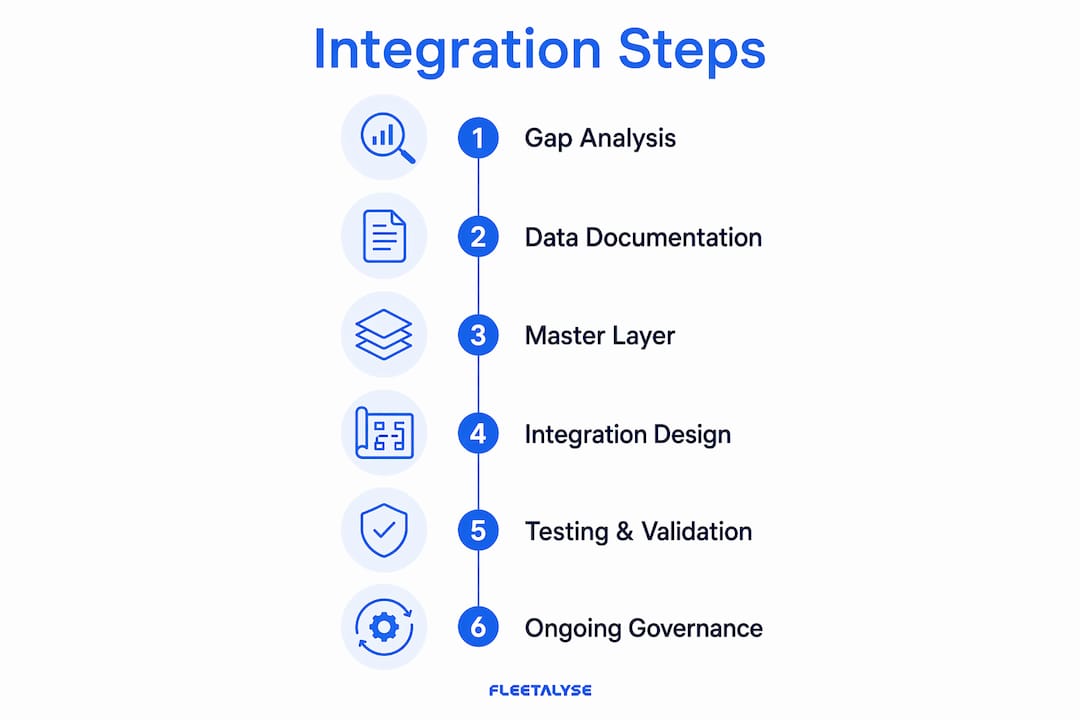
The preparation stage matters more than the technical build. Formal gap analysis of your telematics sources and their authentication methods is more critical than the integration itself. Skipping this step produces duplicate asset records, missed event triggers, and broken reporting joins that take weeks to untangle.

Start by documenting every data source your fleet currently uses. For each one, record the provider name, the API type (REST, WebSocket, MQTT, or direct CAN-bus connection), the authentication method, and the specific data elements it produces. A simple spreadsheet works fine at this stage. The goal is a complete map of what you have before you touch a single configuration.
Building a canonical master data layer
Integration often fails at the identity layer. The fix is a canonical master data layer: a single internal record that maps every vehicle’s VIN, registration plate, and provider-assigned tag to one authoritative asset ID. Without this, a vehicle that appears in three telematics systems under three different identifiers will generate triplicate records and broken joins across your reports.
The same principle applies to drivers. Map driver card numbers, employee IDs, and any provider-assigned tokens to a single internal driver record. This master layer becomes the reference point for every downstream process, from tachograph compliance checks to payroll calculations.
- Document all telematics providers, API types, and authentication credentials
- Record every data element each source produces (position, speed, engine hours, fuel, driver ID)
- Create a vehicle master list mapping VIN, registration, and all provider IDs
- Create a driver master list mapping driver card numbers and employee IDs
- Identify gaps: which business processes lack a reliable data source?
Pro Tip: Register each hardware unit against your master asset list as soon as it is installed. Fleetalyse supports this through its tracker registration process, which ties device identity to vehicle records from day one.
Structured telematics integration projects typically complete within 2–4 weeks when this preparatory work is done thoroughly. That timeline extends significantly when source documentation is incomplete.
How do you design and implement the integration step by step?
The architecture choice shapes everything that follows. Event-driven architectures reduce latency from minutes to sub-second responses for critical telematics events. Legacy polling systems, which query a source on a fixed schedule, cannot match this for time-sensitive triggers like harsh braking alerts or geofence breaches.
A three-layer architecture gives you the flexibility to scale without rebuilding from scratch. The edge layer handles raw data ingestion from devices and APIs. The orchestration layer normalises, validates, and routes events. The business systems layer receives clean, structured data for reporting, compliance, and workflow triggers.
Step-by-step implementation
- Connect your ingestion layer. Configure API gateways for each telematics provider. Use REST for batch data pulls, WebSocket or MQTT for real-time event streams. Authenticate each connection and confirm data is arriving before moving on.
- Set up your event broker. The broker receives raw events and queues them for processing. This decouples your data sources from your business systems, so a provider outage does not break your reporting pipeline.
- Apply field mapping and validation. Map each source’s field names to your internal schema. Validate data types, check for missing mandatory fields, and flag anomalies. Timestamp normalisation is critical: convert all timestamps to UTC and store the original source timestamp alongside it.
- Build your rules engine. Define the conditions that trigger downstream actions. A harsh braking event above a defined threshold triggers a driver behaviour alert. An engine hours reading crossing a service interval triggers a maintenance work order.
- Choose your first integration slice. Do not attempt big-bang integration. Start with one high-impact business process, such as automated maintenance scheduling or driver hours compliance, and build credibility before expanding.
- Correlate data across sources. Join events by vehicle ID, driver ID, and timestamp window. A fuel transaction that cannot be matched to a vehicle journey within a 30-minute window is an exception that needs investigation.
Pro Tip: Build your field mapping as a configuration file, not hardcoded logic. When a provider changes their API schema, you update one file rather than rewriting your integration.
Telematics should automate workflows like maintenance scheduling and payroll, not just display GPS positions on a map. The rules engine is where that shift happens.
What are the most common telematics integration challenges?
Identity mismatches are the most frequent cause of integration failure. A vehicle registered under one ID in your GPS platform and a different ID in your tachograph system will produce split records that corrupt both compliance reports and KPI dashboards. The canonical master data layer described earlier prevents this, but you also need a reconciliation process to catch mismatches that slip through.
Provenance matters. Tracing data back to its original source helps you identify and resolve errors quickly. Normalising schema and timestamp differences without losing source identity is the discipline that separates reliable pipelines from fragile ones.
Timestamp inconsistencies are the second most common problem. Different providers format timestamps differently: some use Unix epoch, others use ISO 8601, and some include timezone offsets while others assume local time. Standardise to UTC at the point of ingestion and always retain the raw source value for audit purposes.
Latency issues appear when teams rely on polling rather than event-driven streaming. A polling interval of five minutes means a harsh braking event could sit unprocessed for up to five minutes before triggering an alert. For safety-critical workflows, that delay is unacceptable.
- Use an exception handling queue for events that fail validation. Review this queue daily during the first month of operation.
- Run reconciliation jobs that compare telematics events with maintenance logs and fuel records. Gaps or mismatches indicate either a data source problem or a process gap.
- Pilot test each integration slice with a subset of vehicles before fleet-wide rollout. A ten-vehicle pilot exposes schema problems and edge cases without affecting your entire operation.
- Set alert thresholds conservatively at first. Too many false positives cause staff to ignore notifications, which defeats the purpose of real-time monitoring.
For fleet vehicle maintenance teams, reconciliation between telematics engine hours and physical service records is particularly valuable. It catches vehicles that have been serviced without the record being updated in the system, or vehicles approaching a service interval that the workshop has not yet flagged.
How do you maintain and optimise telematics workflows over time?
A telematics data integration workflow degrades without active governance. Devices get swapped, vehicles change registration, drivers leave and join, and API schemas change without notice. Each of these events can silently break a workflow that was working perfectly the week before.
Effective telematics programmes operate on a structured review cadence: weekly safety metrics, monthly KPIs, and quarterly trend analysis. This rhythm keeps data actionable and prevents the common problem of generating reports that nobody reads because they arrive too infrequently to influence decisions.
Governance steps for ongoing performance
- Audit device and vehicle pairings monthly. After any maintenance visit or vehicle replacement, confirm that the telematics unit is still correctly paired to the right asset record. A tracker moved to a replacement vehicle without updating the master data layer will corrupt historical comparisons.
- Review alert thresholds quarterly. As driver behaviour improves, thresholds that once caught genuine problems may generate too many low-severity alerts. Adjust them to maintain staff engagement and focus attention on real risks.
- Automate repeatable workflows. Use your integration to trigger maintenance scheduling when engine hours or mileage thresholds are crossed, and to feed driver hours data directly into payroll calculations. Telematics as an automation platform reduces administrative workload and removes the manual steps where errors occur.
- Plan for vendor replacement. Build your integration so that swapping a telematics provider requires only updating the ingestion layer and field mapping configuration. Your orchestration and business systems layers should be provider-agnostic.
Pro Tip: Schedule a quarterly data quality review that specifically checks for vehicles with no events in the past 30 days. A silent device is either faulty or incorrectly paired, and both problems need immediate attention.
Successful telematics integration is business-led. The fleet manager who documents their dispatch-to-payroll workflow before the IT team writes a single line of configuration will get a better result than the one who hands the project entirely to a developer.
Key takeaways
A telematics data integration workflow delivers lasting value only when it combines a canonical master data layer, event-driven architecture, and a structured governance cadence.
| Point | Details |
|---|---|
| Preparation outweighs technical build | Complete a formal gap analysis and master data mapping before configuring any API connections. |
| Event-driven architecture is the right choice | Sub-second event processing replaces polling delays and supports safety-critical alert workflows. |
| Identity layer failures cause most problems | Map every VIN, registration, and provider ID to one internal record to prevent duplicate and broken data. |
| Start small and build credibility | Pilot one high-impact workflow slice before expanding to avoid big-bang integration failures. |
| Governance sustains data quality | Weekly safety reviews, monthly KPIs, and quarterly audits keep the pipeline accurate and useful. |
Why most telematics projects underdeliver, and what actually fixes them
I have seen a pattern repeat itself across UK fleet operations of every size. The telematics hardware goes in, the platform goes live, and within three months the fleet manager is looking at a dashboard full of data they do not trust and reports that nobody reads. The technology is not the problem. The process is.
The projects that work are led by the business, not the IT department. The fleet manager sits down before any configuration starts and maps out every workflow that touches vehicle or driver data: dispatch, maintenance scheduling, driver hours, fuel reconciliation, payroll. That map reveals where data is trusted, where it is duplicated, and where it is simply missing. That is the real gap analysis, and it is worth more than any API documentation.
Starting small is not a compromise. It is the correct strategy. A single workflow, done well, builds the internal credibility that gets the next workflow approved. A fleet that automates maintenance scheduling based on live engine hours data has a concrete, measurable result to point to. That result funds the next phase.
The human factor is consistently underestimated. Drivers and workshop staff need to understand why the system exists and what it does with their data. Fleets that invest in a brief explanation at rollout see far less resistance and far better data quality than those that simply install hardware and say nothing.
Future-proofing comes down to one discipline: keep your orchestration layer provider-agnostic. The telematics market changes. Providers get acquired, pricing changes, and better hardware becomes available. If your business logic lives in a vendor-specific configuration, you are locked in. If it lives in your own rules engine, you can swap providers without rebuilding anything.
— Vytautas
How Fleetalyse supports your telematics data integration
UK fleet operators who want a platform that handles data collection, normalisation, and compliance reporting without building a custom pipeline from scratch will find Fleetalyse worth a close look.
Fleetalyse connects GPS trackers, tachograph units, and driver behaviour monitoring into a single platform, with all data normalised against a consistent vehicle and driver master record. The Teltonika FMC650 HGV tracker feeds live position, engine hours, and CAN-bus data directly into the Fleetalyse platform, supporting automated maintenance triggers and DVSA compliance workflows. For mixed fleets, the full range of GPS tracking solutions covers vans, trailers, and assets alongside HGVs. UK-based support means you get local expertise when configuration questions arise, not a generic helpdesk.
FAQ
What is a telematics data integration workflow?
A telematics data integration workflow is the structured process of connecting vehicle data sources, normalising their outputs, and routing clean data into fleet management and business systems. It replaces manual data handling with automated, event-driven processing.
How long does telematics integration take to complete?
Structured integration projects typically complete within 2–4 weeks when source documentation and gap analysis are completed thoroughly before configuration begins.
Why does telematics integration fail at the identity layer?
Integration fails at the identity layer when the same vehicle or driver appears under different IDs across multiple systems. Creating a canonical master data layer that maps all source identifiers to one internal record prevents this problem.
What is the best review cadence for telematics data?
The recommended cadence is weekly safety metrics, monthly KPI reviews, and quarterly trend analysis. This rhythm keeps data actionable and ensures alert thresholds remain calibrated to current fleet behaviour.
Should telematics integration be led by IT or operations?
Business-led integration consistently outperforms IT-led projects. Fleet managers should document their operational workflows first, then involve technical teams to configure the data pipeline around those documented processes.