
What if knowing where your vehicles are is only the beginning? Fleet telematics is often confused with GPS tracking, but a broader system can bring location data together with information about vehicles, drivers, trailers and compliance tasks. Its value comes from connecting that information to decisions your team makes every day.
If you’re concerned that another platform could mean more screens and administration, that’s a fair question. Visibility is useful only when the data is clear and relevant to your operation. For UK fleets, that could mean viewing vehicle locations alongside live driver-hours information or remote tachograph downloads, rather than treating tracking and compliance as separate jobs.
This guide explains the main components of a fleet telematics system and how data moves from vehicles and assets into information managers can use. You’ll learn how GPS tracking differs from broader telematics, which capabilities may suit your vehicles, drivers and trailers, and what to check when assessing suppliers. It also provides a practical way to define your requirements and plan next steps, so you can judge whether a system fits your workflows before adding new technology.
Key Takeaways
- Use fleet telematics to connect vehicle and asset data with practical decisions, rather than treating location as the only measure of visibility.
- Trace how data is captured, transmitted and organised to understand what a system can reliably show your team.
- Compare GPS tracking and broader telematics by the data and day-to-day tasks your operation needs to manage.
- Map your workflows and requirements across HGVs, vans, trailers and other assets before assessing suppliers.
- Consider how GPS tracking, driver-hours visibility and remote tachograph downloads could support your existing compliance workflows.
What is fleet telematics, and what does it tell a fleet manager?
Fleet telematics uses connected devices to collect and transmit vehicle or asset data, so a business can use it to manage its operation. A system may combine an in-vehicle device, mobile connectivity and software that presents selected data to a manager. The information available depends on the hardware, vehicle, software and service configuration.
Raw data isn’t automatically useful. A location point becomes more helpful when a manager can see which vehicle is near a collection site. Driver-hours information may help with planning a job or checking which drivers are available. The value comes from presenting relevant information in a form that supports a decision, not simply collecting more data. For a broader overview of the components and applications, see this Fleet telematics system reference.
What data can a fleet telematics system collect?
Where the installed device supports it, GPS can provide location and movement data. Other vehicle, driver or asset information depends on the equipment fitted and how the service is set up. An HGV system might provide vehicle location alongside selected driver-hours information. A van setup may focus on vehicle visibility, while a trailer tracker may help show where a trailer or other mobile asset is. These are examples, not standard features of every system.
Before comparing services, identify what information your team needs and which vehicles or assets need to provide it. Ask suppliers to confirm what data is available for your specific vehicles, what hardware is required and how the information is presented. Don’t assume a feature is included just because it’s described as telematics.
How does telematics differ from basic vehicle tracking?
Basic vehicle tracking centres on location visibility: where a vehicle is, or where it has been, according to the tracking service. Real-time tracking can be one part of a wider telematics service. Telematics describes a broader approach, where data from vehicles, drivers or assets can support operational tasks as well as location checks.
For example, GPS tracking can help a manager check a vehicle’s position, while a separate driver-hours capability can show relevant hours information. Remote tachograph downloads may support a different compliance workflow. These capabilities can sit within a fleet telematics setup, but availability and integration vary by provider and configuration.
The practical question is what your operation needs to see in one place and what it needs to do with that information. A location-only service may suit a straightforward tracking requirement. If you also need visibility across trailers or access to driver-hours and tachograph data, check each capability separately, including how it fits your existing processes.
How fleet telematics moves data from vehicles into daily decisions
A useful system does more than collect information. It moves selected data from a vehicle or asset to a platform, where a manager can review it and decide what to do next. The stages are straightforward, but hardware and available data can differ between services. For a general overview of how telematics works, Forbes explains the basic role of connected devices and software.
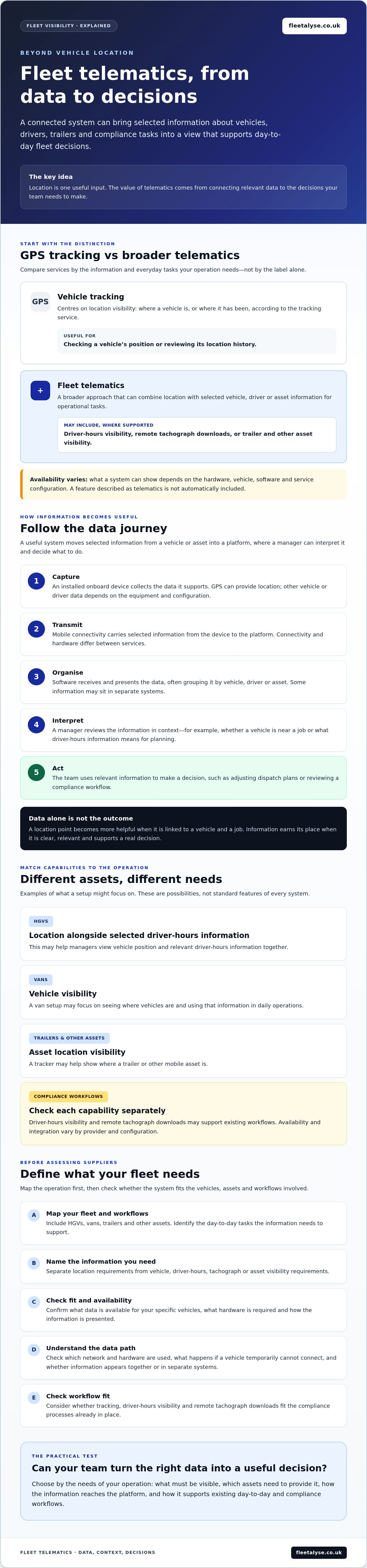
- 1. Capture: An installed onboard device collects the data it supports. GPS can provide location information; other vehicle or driver data depends on the equipment and configuration.
- 2. Transmit: The device sends selected information using mobile connectivity. Ask the supplier which network and hardware are used, and what happens if a vehicle temporarily can’t connect.
- 3. Organise: A software platform receives and presents the data, often grouping it by vehicle, driver or asset. Check what information appears together and whether separate systems are involved.
- 4. Interpret: A manager reviews the information in context. A vehicle location may help assess which vehicle is near a job; driver-hours information may help with operational planning.
- 5. Act: The team uses relevant information to make a decision, such as adjusting dispatch plans or reviewing a compliance workflow.
From an onboard device to a fleet dashboard
GPS provides the location input where the installed device supports it. The onboard equipment gathers that input and other configured data, then mobile connectivity carries it to the platform. The platform turns incoming records into a view a manager can use. For example, a dispatcher might check a vehicle’s displayed location before deciding which job to allocate. The usefulness of that view depends on the data being available and current enough for the task.
Confirm the system’s supported data, update frequency and any connectivity limits with the supplier. Don’t assume every device reports at the same interval or that every vehicle can provide the same information.
Where tachograph and driver-hours data fit
Remote tachograph downloads and live driver-hours visibility relate to transport compliance, but they serve different purposes. A remote download transfers tachograph data for handling and review. Live driver-hours information gives managers a view of relevant hours status to support day-to-day decisions. Tachograph analysis integration may help organise downloaded information within an existing review process.
Before relying on a workflow, check current UK requirements against authoritative guidance, then confirm the supplier’s compatibility with your vehicles and tachograph analysis software. Ask how information moves between systems, who reviews it and what the platform does when data isn’t available. If you’re assessing these capabilities alongside tracking, you can review tracking and tachograph options.
Fleet telematics versus GPS tracking: compare the capabilities you need
GPS tracking can be a telematics capability, while telematics may include more. The difference is scope, not a choice between competing technologies. Tracking focuses on vehicle location; a broader system may bring together selected vehicle, driver, trailer or compliance information. The right fit depends on what your operation needs to see and manage.
| Area | GPS tracking | Broader telematics |
|---|---|---|
| Purpose | Show vehicle location and, depending on the service, movement history. | Combine selected data sources to support a wider set of operational workflows. |
| Typical data | GPS location information. | May include location alongside configured vehicle, driver-hours, trailer, asset or tachograph information. |
| Manager use | Check where vehicles are and support dispatch decisions. | Review relevant information across vehicles and assets, or support driver-hours and tachograph processes. |
| Ask the supplier | What coverage, location updates and user access are included? | Which data is supported, what integrations are available, and how does the system fit existing workflows? |
When is GPS fleet tracking enough?
If your main requirement is knowing where vehicles are to support dispatch visibility, a tracking-focused service may be a sensible fit. It isn’t automatically inadequate because it doesn’t include wider data tools. Check how coverage works across your routes, how often location information updates, what happens when connectivity is unavailable and which team members can access the tracking view. Confirm these details against your vehicles and daily working patterns.
When might a fleet need wider telematics capabilities?
Wider capabilities may be useful when location alone doesn’t answer the questions your team needs to resolve. An HGV operator might also need driver-hours visibility or remote tachograph downloads. A van fleet may prioritise vehicle tracking, while a business using trailers or other mobile assets may need to track those as well. Mixed fleets can have different requirements for each vehicle or asset type, so check support individually.
Integration matters too. If tachograph data needs to move into analysis software, confirm which systems are compatible and how information is transferred. Ask whether the proposed setup fits your current management process or would create a separate task. Don’t choose a broader package just for the label. List the decisions and workflows you need to support, then compare suppliers against those requirements.
How to assess fleet telematics for your operation before choosing a system
Start with the work the system needs to support, not a long feature list. More data won’t help if nobody knows what decision to make from it. Use this checklist to define a practical scope before speaking to suppliers.
- Define your fleet needs. Identify the assets in scope: HGVs, vans, trailers or a mix. Note the main issue to address, such as locating vehicles, planning dispatch or improving visibility of driver hours.
- Map current workflows. Write down how your team handles those tasks now, including manual checks, handovers and tachograph analysis processes. This helps reveal where a system could fit and where it might add another step.
- Identify required data. For every capability, name the decision or task it should support. For example, vehicle location may inform dispatch planning; trailer location may help find an asset; driver-hours information may support operational planning.
- Check integration and access. Ask how the system works with your current tachograph analysis and fleet-management processes. Confirm what data can be accessed, by whom, and how information is handled.
- Plan adoption and review. Confirm hardware requirements, installation arrangements, staff communication, training and supplier support. Consider a measured rollout, then review whether the data supports the intended decisions.
Which fleet problems should the system solve first?
Separate essential requirements from useful additions. A van operator focused on dispatch may need location visibility first. An HGV operation may also want driver-hours awareness or a way to manage tachograph downloads. A business with trailers or other mobile assets may need to locate those separately from its vehicles. Before assessing claims of improvement, record a baseline: how much administration the task takes now and what your team can currently see.
That baseline gives you something concrete to compare during evaluation. It also helps you avoid specifying features that don’t solve a real operational problem.
What should you check about integration and rollout?
Ask suppliers to explain how information moves between the proposed system and the tools your team already uses. Confirm compatibility with your vehicles and tachograph analysis software rather than assuming it. Discuss how users will get access, what training is available and how staff will be told about tracking and data handling. Check the supplier’s support arrangements and who to contact if a workflow or data feed isn’t working as expected.
Keep the review focused: did the system provide the information needed, and could staff use it within existing processes? To compare options against your requirements, review fleet tracking and compliance options.
How Fleetalyse connects fleet tracking with compliance workflows
Once you’ve defined what your operation needs, compare services against those requirements. Fleetalyse offers GPS fleet tracking alongside remote tachograph downloads, live driver-hours monitoring, and trailer and asset tracking. These capabilities can bring location and compliance-related data into workflows your team already manages. The right combination depends on your vehicles, processes and priorities.
Which Fleetalyse services may fit different fleet needs?
GPS tracking can provide location visibility for HGVs and vans. Trailer and asset tracking can help businesses monitor equipment beyond powered vehicles. For workflows involving driver-hours awareness or tachograph data, Fleetalyse offers live driver-hours monitoring and remote tachograph downloads. Its tachograph analysis integration supports data management and review. These services address different needs, so consider which information your team needs and how it will use it.
For example, a mixed operation might want to check vehicle locations for dispatch planning, see where trailers are and manage tachograph information through an existing analysis process. That doesn’t mean every fleet needs every capability. Treat fleet telematics as a set of operational choices: select the services that match defined tasks, and confirm how each one works for your vehicles and assets.
What to clarify before taking the next step
Before proceeding, discuss your fleet size, vehicle and asset types, current tachograph analysis arrangements and priority use cases with Fleetalyse. Confirm compatibility, hardware requirements, available integrations and service terms directly. Ask how information is accessed and handled, and whether the proposed setup fits the way your team manages tracking and compliance tasks.
Be specific about the job you want each capability to do. For instance, clarify whether you need location visibility for vans, trailer tracking, live driver-hours information, remote downloads or a combination. Check that the proposed configuration supports those requirements rather than assuming all features or integrations are included as standard.
If the service mix appears relevant, you can review Fleetalyse’s available options as a next step. Use the discussion to confirm fit, compatibility and terms before making a decision.
Choose a system that fits the way your fleet works
Fleet telematics is most useful when the information it collects supports a clear operational task. GPS tracking can provide location visibility, while a wider setup may also bring together driver-hours, tachograph and asset information. The right scope depends on your vehicles, current workflows and the decisions your team needs to make.
Before choosing a supplier, define your priorities and check the details that affect day-to-day use: vehicle compatibility, hardware, data access and integration with your existing processes. Fleetalyse offers GPS fleet and asset tracking for HGVs, vans, trailers and other mobile assets, alongside remote tachograph downloads and live driver-hours monitoring. Tachograph analysis software integration is also available, but confirm compatibility with your existing system.
If those services match your requirements, explore Fleetalyse’s services and take the next step. A clear list of needs will help you ask focused questions and assess whether the proposed setup is right for your operation.
Frequently Asked Questions
What is fleet telematics?
Fleet telematics combines connected devices, communications and software to collect and present vehicle or asset data. The information available depends on the hardware fitted, the vehicle and the service configuration. GPS location tracking is one possible feature, not the whole system. Other supported data may relate to drivers, vehicles or assets. The practical purpose is to help a fleet manager use relevant information to make operational decisions, such as checking locations or reviewing driver-hours status.
How does fleet telematics work?
A device or sensor first collects the data it supports, such as GPS location. Mobile connectivity then transmits that information to a software platform, which organises it for users. A manager reviews the relevant view or report and decides what action to take, such as checking a vehicle’s position before allocating a job. Data availability and update frequency vary by system, vehicle and configuration, so confirm these details with the supplier.
Is fleet telematics the same as GPS tracking?
No. GPS tracking focuses on vehicle location, whilst fleet telematics describes a broader system that may combine location with other supported vehicle, driver or asset information. For example, a service could bring GPS tracking together with trailer visibility or driver-hours information. Providers package these features differently, so compare the capabilities, hardware and workflows on offer. Don’t rely on labels such as “tracking” or “telematics” alone to establish what’s included.
Can fleet telematics help with tachograph and driver-hours management?
It can support these workflows if the chosen service includes the relevant capabilities. Remote tachograph downloads can transfer data for review, whilst live driver-hours visibility can provide information for operational planning. Tachograph analysis integration may help organise data within a review process. These functions aren’t automatic in every tracking system. Check compatibility with your vehicles and analysis software, and confirm current tachograph requirements using authoritative UK guidance before relying on a process.
How much does fleet telematics cost?
There isn’t one cost that applies to every fleet. The overall price may depend on hardware, vehicle and asset types, installation, service scope, integrations and ongoing subscription terms. Ask suppliers for a written breakdown of initial and recurring charges, contract conditions and any additional fees. Check which capabilities are included and which may cost extra. This helps you compare like with like without assuming a quoted feature or service is part of the price.
What should I look for in a fleet telematics system?
Start with the operational problem you need to solve, then check that the system supplies the data and workflows required. Review compatibility with your vehicles and assets, tracking coverage, relevant driver-hours or tachograph capabilities, analysis integrations, user access, rollout support and contract terms. Ask the supplier to demonstrate realistic tasks, such as locating a vehicle or finding driver-hours information. Verify performance claims and data update behaviour before deciding.
Does fleet telematics work for vans, HGVs and trailers?
It can, but hardware and available data vary by asset and service. Fleetalyse offers GPS tracking for HGVs, vans, trailers and other mobile assets. Before deployment, confirm the specific device, installation method, connectivity and functionality for each vehicle or asset type with the provider. A mixed fleet may need different configurations across powered vehicles and trailers, so check each use case rather than assuming one setup will suit every asset.
Frequently asked questions
What data can a fleet telematics system collect?
Where the installed device supports it, GPS can provide location and movement data. Other vehicle, driver or asset information depends on the equipment fitted and how the service is set up. An HGV system might provide vehicle location alongside selected driver-hours information. A van setup may focus on vehicle visibility, while a trailer tracker may help show where a trailer or other mobile asset is. These are examples, not standard features of every system. Before comparing services, identify what information your team needs and which vehicles or assets need to provide it. Ask suppliers to confirm what data is available for your specific vehicles, what hardware is required and how the information is presented. Don’t assume a feature is included just because it’s described as telematics.
How does telematics differ from basic vehicle tracking?
Basic vehicle tracking centres on location visibility: where a vehicle is, or where it has been, according to the tracking service. Real-time tracking can be one part of a wider telematics service. Telematics describes a broader approach, where data from vehicles, drivers or assets can support operational tasks as well as location checks. For example, GPS tracking can help a manager check a vehicle’s position, while a separate driver-hours capability can show relevant hours information. Remote tachograph downloads may support a different compliance workflow. These capabilities can sit within a fleet telematics setup, but availability and integration vary by provider and configuration. The practical question is what your operation needs to see in one place and what it needs to do with that information. A location-only service may suit a straightforward tracking requirement. If you also need visibility across trailers or access to driver-hours and tachograph data, check each capability separately, including how it fits your existing processes. A useful system does more than collect information. It moves selected data from a vehicle or asset to a platform, where a manager can review it and decide what to do next. The stages are straightforward, but hardware and available data can differ between services. For a general overview of how telematics works, Forbes explains the basic role of connected devices and software.
When is GPS fleet tracking enough?
If your main requirement is knowing where vehicles are to support dispatch visibility, a tracking-focused service may be a sensible fit. It isn’t automatically inadequate because it doesn’t include wider data tools. Check how coverage works across your routes, how often location information updates, what happens when connectivity is unavailable and which team members can access the tracking view. Confirm these details against your vehicles and daily working patterns.
When might a fleet need wider telematics capabilities?
Wider capabilities may be useful when location alone doesn’t answer the questions your team needs to resolve. An HGV operator might also need driver-hours visibility or remote tachograph downloads. A van fleet may prioritise vehicle tracking, while a business using trailers or other mobile assets may need to track those as well. Mixed fleets can have different requirements for each vehicle or asset type, so check support individually. Integration matters too. If tachograph data needs to move into analysis software, confirm which systems are compatible and how information is transferred. Ask whether the proposed setup fits your current management process or would create a separate task. Don’t choose a broader package just for the label. List the decisions and workflows you need to support, then compare suppliers against those requirements. Start with the work the system needs to support, not a long feature list. More data won’t help if nobody knows what decision to make from it. Use this checklist to define a practical scope before speaking to suppliers.
Which fleet problems should the system solve first?
Separate essential requirements from useful additions. A van operator focused on dispatch may need location visibility first. An HGV operation may also want driver-hours awareness or a way to manage tachograph downloads. A business with trailers or other mobile assets may need to locate those separately from its vehicles. Before assessing claims of improvement, record a baseline: how much administration the task takes now and what your team can currently see. That baseline gives you something concrete to compare during evaluation. It also helps you avoid specifying features that don’t solve a real operational problem.
What should you check about integration and rollout?
Ask suppliers to explain how information moves between the proposed system and the tools your team already uses. Confirm compatibility with your vehicles and tachograph analysis software rather than assuming it. Discuss how users will get access, what training is available and how staff will be told about tracking and data handling. Check the supplier’s support arrangements and who to contact if a workflow or data feed isn’t working as expected. Keep the review focused: did the system provide the information needed, and could staff use it within existing processes? To compare options against your requirements, review fleet tracking and compliance options. Once you’ve defined what your operation needs, compare services against those requirements. Fleetalyse offers GPS fleet tracking alongside remote tachograph downloads, live driver-hours monitoring, and trailer and asset tracking. These capabilities can bring location and compliance-related data into workflows your team already manages. The right combination depends on your vehicles, processes and priorities.
Which Fleetalyse services may fit different fleet needs?
GPS tracking can provide location visibility for HGVs and vans. Trailer and asset tracking can help businesses monitor equipment beyond powered vehicles. For workflows involving driver-hours awareness or tachograph data, Fleetalyse offers live driver-hours monitoring and remote tachograph downloads. Its tachograph analysis integration supports data management and review. These services address different needs, so consider which information your team needs and how it will use it. For example, a mixed operation might want to check vehicle locations for dispatch planning, see where trailers are and manage tachograph information through an existing analysis process. That doesn’t mean every fleet needs every capability. Treat fleet telematics as a set of operational choices: select the services that match defined tasks, and confirm how each one works for your vehicles and assets.
What is fleet telematics?
Fleet telematics combines connected devices, communications and software to collect and present vehicle or asset data. The information available depends on the hardware fitted, the vehicle and the service configuration. GPS location tracking is one possible feature, not the whole system. Other supported data may relate to drivers, vehicles or assets. The practical purpose is to help a fleet manager use relevant information to make operational decisions, such as checking locations or reviewing driver-hours status.
How does fleet telematics work?
A device or sensor first collects the data it supports, such as GPS location. Mobile connectivity then transmits that information to a software platform, which organises it for users. A manager reviews the relevant view or report and decides what action to take, such as checking a vehicle’s position before allocating a job. Data availability and update frequency vary by system, vehicle and configuration, so confirm these details with the supplier.
Is fleet telematics the same as GPS tracking?
No. GPS tracking focuses on vehicle location, whilst fleet telematics describes a broader system that may combine location with other supported vehicle, driver or asset information. For example, a service could bring GPS tracking together with trailer visibility or driver-hours information. Providers package these features differently, so compare the capabilities, hardware and workflows on offer. Don’t rely on labels such as “tracking” or “telematics” alone to establish what’s included.
Can fleet telematics help with tachograph and driver-hours management?
It can support these workflows if the chosen service includes the relevant capabilities. Remote tachograph downloads can transfer data for review, whilst live driver-hours visibility can provide information for operational planning. Tachograph analysis integration may help organise data within a review process. These functions aren’t automatic in every tracking system. Check compatibility with your vehicles and analysis software, and confirm current tachograph requirements using authoritative UK guidance before relying on a process.
How much does fleet telematics cost?
There isn’t one cost that applies to every fleet. The overall price may depend on hardware, vehicle and asset types, installation, service scope, integrations and ongoing subscription terms. Ask suppliers for a written breakdown of initial and recurring charges, contract conditions and any additional fees. Check which capabilities are included and which may cost extra. This helps you compare like with like without assuming a quoted feature or service is part of the price.
What should I look for in a fleet telematics system?
Start with the operational problem you need to solve, then check that the system supplies the data and workflows required. Review compatibility with your vehicles and assets, tracking coverage, relevant driver-hours or tachograph capabilities, analysis integrations, user access, rollout support and contract terms. Ask the supplier to demonstrate realistic tasks, such as locating a vehicle or finding driver-hours information. Verify performance claims and data update behaviour before deciding.
Does fleet telematics work for vans, HGVs and trailers?
It can, but hardware and available data vary by asset and service. Fleetalyse offers GPS tracking for HGVs, vans, trailers and other mobile assets. Before deployment, confirm the specific device, installation method, connectivity and functionality for each vehicle or asset type with the provider. A mixed fleet may need different configurations across powered vehicles and trailers, so check each use case rather than assuming one setup will suit every asset.