
A traffic office caller says a van's late, but the question isn't just where it is. You need to know whether the driver can still legally take the return load, whether the trailer is still attached at the services, whether the route has drifted off plan, and whether the paperwork will stand up if someone asks for proof later.
That's why commercial vehicle tracking can't be treated as a single map screen. For UK fleets, it has to work as a connected operating system, where location, driver hours, asset movement, behaviour data and compliance records all feed different day-to-day decisions.
Table of Contents
- What UK Fleets Need from Vehicle Tracking
- How Commercial Vehicle Tracking Works
- Operational Benefits for UK Fleets
- Tracking Needs Across Mixed Fleets
- Planning a Commercial Fleet Rollout
- Building a Practical ROI Model
- Common Mistakes and Governance Risks
- Choosing a Supplier and Next Steps
What UK Fleets Need from Vehicle Tracking
A live map is useful, but it only answers one of the questions your depot faces. A transport manager might see a dot on the screen and still have no clear answer on whether the driver is within hours, whether the delivery window can still be met, or whether a trailer has been dropped somewhere it shouldn't be.
The practical job of commercial vehicle tracking is to reduce that uncertainty. In UK haulage and mixed fleets, the system needs to support dispatch, customer updates, site arrival checks, behaviour review, maintenance planning and asset protection. It also has to fit the way British operators work, with Operator Licence duties, driver-hours oversight and site access rules that can't be guessed at by a simple GPS pin.
Practical rule: if a tracking alert doesn't change a decision, it's probably just noise.
That's where the distinction matters. Location visibility tells you where the vehicle is. Compliance workflows tell you whether the records are there. Driver monitoring tells you whether a pattern needs coaching or review. Those are different problems, and a fleet platform needs to handle all three without turning the office into a dashboard-watching exercise.
For a buyer comparing options, a good starting point is a checklist of the features that affect daily operations, not just the ones that look good in a demo. Fleet teams often use a features checklist to sort the useful capabilities from the decorative ones, and that kind of buying discipline matters when the platform has to serve both dispatch and compliance. See the vehicle tracking features checklist for UK fleets if you want a structured way to compare systems.
The bigger point is this. A fleet doesn't need more dots on a map. It needs fewer unknowns between the yard, the roadside and the customer's gate.
How Commercial Vehicle Tracking Works
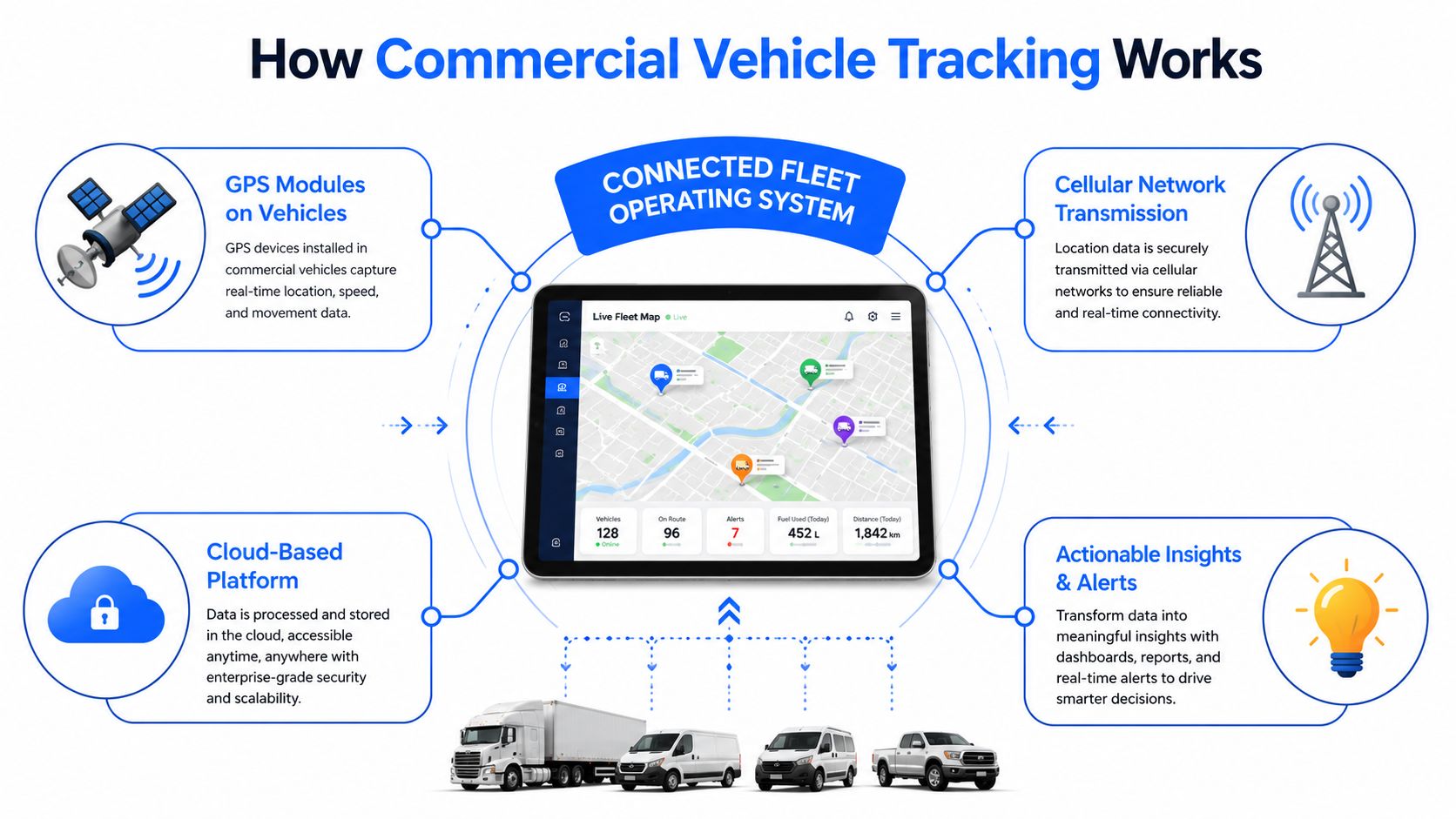
Think of a tracking platform as a small operating system for the fleet, not a single gadget. One part gathers position, another captures vehicle data, another handles compliance records, and the software turns all of that into alerts, reports and route history.
GPS, telematics and the cloud
The first layer is the vehicle itself. GPS modules provide position and movement data, while a telematics device can add vehicle-bus readings, driver identification and event capture before sending data back over cellular networks. In a UK fleet, that data usually lands in a cloud dashboard where planners can see live status, route history and exceptions.
Connectivity matters because vehicles are never all in the same place at once. A unit on a motorway, a van in a city centre and a trailer in a yard all need reliable transmission, which is why 4G and multi-network SIMs are common in commercial setups. The point isn't just that the device reports. It's that the office can act on the report fast enough to change the day.
Tachograph records and dashcams
Remote tachograph downloads are a different layer again. They pull driver and vehicle-unit records directly from the digital tachograph, so compliance teams can review hours, rest periods and infringement data without waiting for a manual download from the cab. That's a separate function from location tracking, and it exists for a separate purpose.
Dashcams sit beside that, not inside it. A camera can capture incidents, distracted driving signals and collision footage, then link that evidence to a journey and a driver record. Vektracer's how-it-works page is a useful reference if you want to see how a camera-linked workflow is usually presented alongside tracking and telematics.
A tracking screen without context is just a map. The useful system tells you what happened, who was involved and what needs attention next.
That's also where geofences, route replays and exception alerts come in. A geofence can confirm site arrival, a replay can show whether a route was followed, and an exception alert can flag a breach without forcing someone to study every mile. The best setups don't drown the depot in data, they surface the moments that need a decision.
Operational Benefits for UK Fleets
The first operational win is usually administrative rather than dramatic. When tachograph downloads happen automatically, office staff spend less time chasing files from driver cards and vehicle units, and more time checking whether the records are complete enough for inspection and audit. That matters because the compliance value comes from keeping the record set intact, not from knowing roughly where a lorry was at lunchtime.
Turning data into decisions
GPS and telematics data support dispatch decisions that used to rely on phone calls and guesswork. If a driver's hours are tight, you can avoid allocating another run that would push the shift too far. If a customer asks for an ETA, you can answer with actual movement data rather than a hopeful estimate.
The same pattern works for behaviour and fuel-related insight. Harsh braking, idling, speeding and inefficient routes should be treated as coaching prompts and planning clues, not as proof that a driver has failed. The data gives the transport manager something concrete to discuss, especially when the same patterns keep showing up on the same routes.
Here's a simple way to map the data streams to the decisions they support.
| Data stream | Operational decision it supports | Example UK fleet use |
|---|---|---|
| Remote tachograph downloads | Whether the depot has complete legal records | Checking driver-card files before an audit |
| Live GPS tracking | Which vehicle should take the next job | Reassigning the nearest van to a short-notice call |
| Route history | Whether a journey matched the planned route | Reviewing a repeated detour to a site |
| Driver behaviour data | What needs coaching or review | Discussing repeated idling in urban drops |
| Geofence alerts | Whether a vehicle arrived, left or moved unexpectedly | Confirming gate arrival at a customer yard |
| Maintenance reminders | Whether service work is due | Flagging a vehicle before a scheduled inspection |
Maintenance planning is stronger when the system exposes fault codes or service triggers early. A manager doesn't need a dramatic failure to justify action, only enough visibility to bring a vehicle in before a small issue becomes a roadside problem. That's where tracking and maintenance overlap without becoming the same thing.
Asset protection follows the same logic. Trailer tracking, movement alerts and immobilisation prompts help the team notice a problem quickly, then provide evidence if a theft or unauthorised movement needs to be investigated. In practice, the question is simple. If something moves when it shouldn't, how quickly will the office know?
For wider operational context, Matil's 2026 guide to operational efficiency is a useful companion piece if you want to think about tracking data as part of a broader control system rather than a stand-alone dashboard.
Tracking Needs Across Mixed Fleets
A depot manager looking at a mixed fleet often needs to answer three different questions at once. Where is each asset now, what does each vehicle need to do next, and which records must be kept straight for compliance or audit checks?
By asset type
An HGV usually needs the strongest compliance focus. Driver-hours visibility, tachograph downloads and a clear link between vehicle, driver and trailer matter because the operating question is often legality as much as location. A van is usually judged more on route completion, idling and job-level visibility, since the daily pressure is customer service and utilisation rather than long-distance compliance alone.
Trailers and containers suit battery-powered trackers because they may sit detached for hours or days. The priority is movement alerts, location recovery and confidence that the asset has not disappeared from the yard or a site. That is a different operating problem from a permanently powered unit in a cab.
Mixed fleets need one reporting language, otherwise the office ends up comparing apples with oranges. If the transport manager has to rebuild the logic for every vehicle class, the system becomes harder to trust and harder to use. A consistent view across owned, hired and subcontracted assets makes it easier to compare utilisation and exceptions without separate spreadsheets for each category. For a more detailed breakdown of mixed-fleet tracking setups for 2026, see a detailed breakdown of mixed-fleet tracking setups for 2026.
| Asset type | Core tracking priorities | Typical add-ons |
|---|---|---|
| HGV | Driver hours, tachograph records, trailer pairing | Route history, compliance alerts, camera integration |
| Van | Job progress, geofences, idling, route completion | Behaviour scores, maintenance reminders |
| Trailer | Movement alerts, yard visibility, recovery support | Battery power, long-life reporting |
| Container or plant | Location, unauthorised movement, asset protection | Battery tracker, historical playback |
| Mixed fleet | Common reporting, comparable utilisation, exception management | Role-based dashboards, integrations |
Fleetalyse is one option in this space, with GPS tracking, remote tachograph downloads, driver behaviour insight and camera integration for commercial vehicles. For a mixed fleet buyer, the key test is whether those pieces work together cleanly across the asset types you run, not whether a sales demo looks polished.
The practical difference is simple. A good tracking setup does not force HGVs, vans and trailers into one false template. It gives each asset the tracking priorities it needs, then lets the office compare them on the same screen.
Planning a Commercial Fleet Rollout
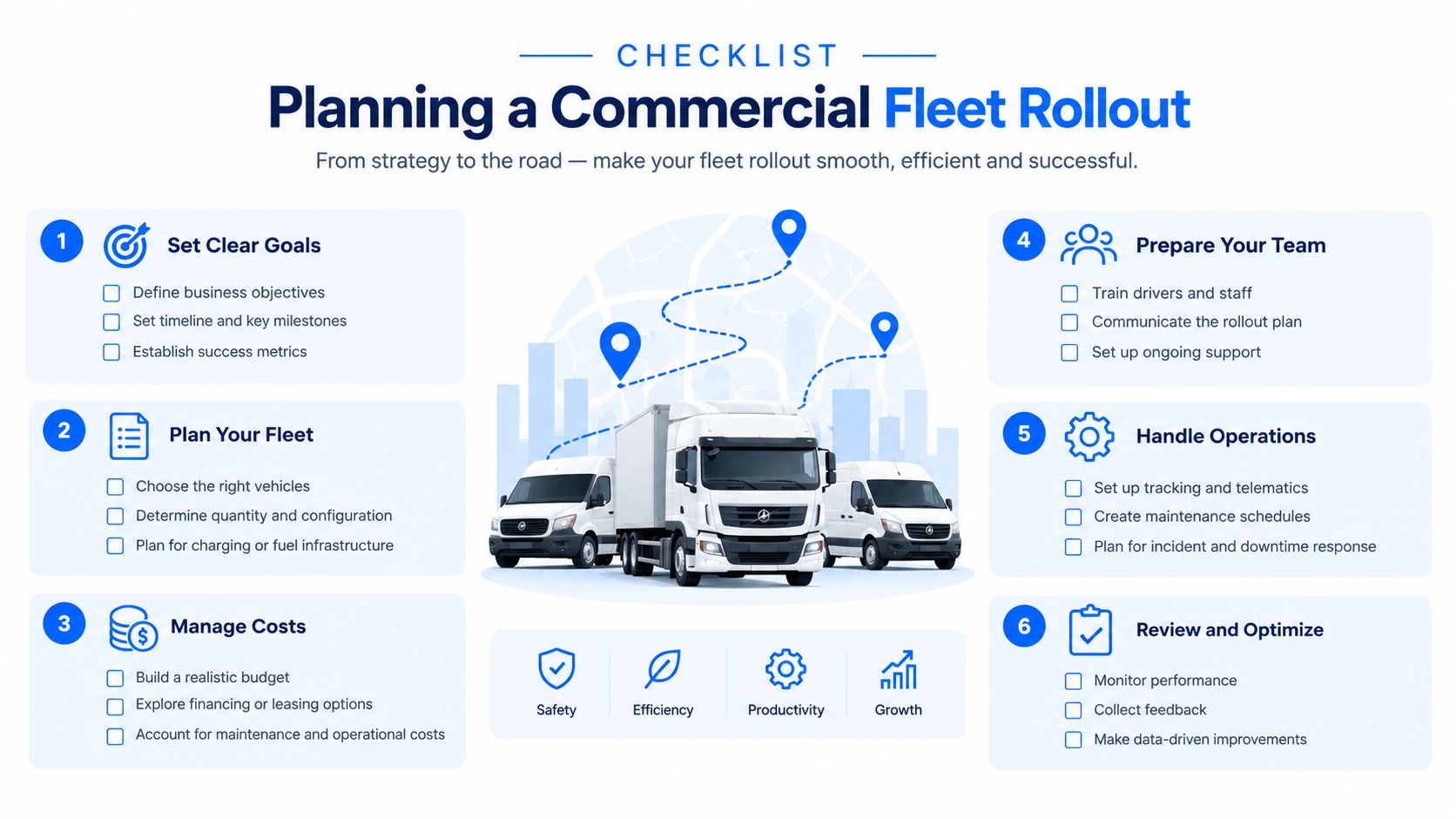
A rollout goes smoother when you treat it like an operational change, not a hardware delivery. Start with the question the fleet is trying to answer. If the team wants compliance control, the setup will look different from a rollout aimed at route visibility or trailer recovery.
Build the rollout around the fleet, not the brochure
First, audit what you're fitting. Hardwired trackers suit some vehicles, OBD units suit others, and trailers or detached assets often need a battery device. Dashcams, tachograph interfaces and CAN bus links should be chosen for the actual vehicle type, not added just because they're available.
Then look at connectivity and installation. A multi-network SIM may make more sense for vehicles that move across patchy coverage, while a tightly scheduled installation plan keeps workshop time down. If a vehicle is off the road for fitment, that downtime needs to be planned like any other maintenance task.
Make the office ready before go-live
Data integration matters as much as hardware. If fuel cards, maintenance systems, routing tools and tachograph analysis all exist separately, the rollout should define what flows where and who owns the exceptions. Role-based permissions help here, because a planner, a compliance manager and a workshop lead don't need the same screen or the same level of access.
Driver communication has to be direct and written. Explain the purpose, the data use and the privacy position before the first device goes live, and keep that notice aligned with your policies. Then test the setup with sample journeys, alert thresholds and a short go-live review before you scale across the rest of the fleet.
The best rollouts start small, prove the workflow and only then expand. That approach gives the team time to spot bad alert settings, weak installation choices or reporting gaps before they affect the whole operation.
Building a Practical ROI Model
A defensible ROI model starts with a baseline, not a promise. Before rollout, record what the fleet already does in areas such as utilisation, idling, unauthorised mileage, maintenance spend, fuel consumption, tachograph admin time, theft history and compliance evidence handling.
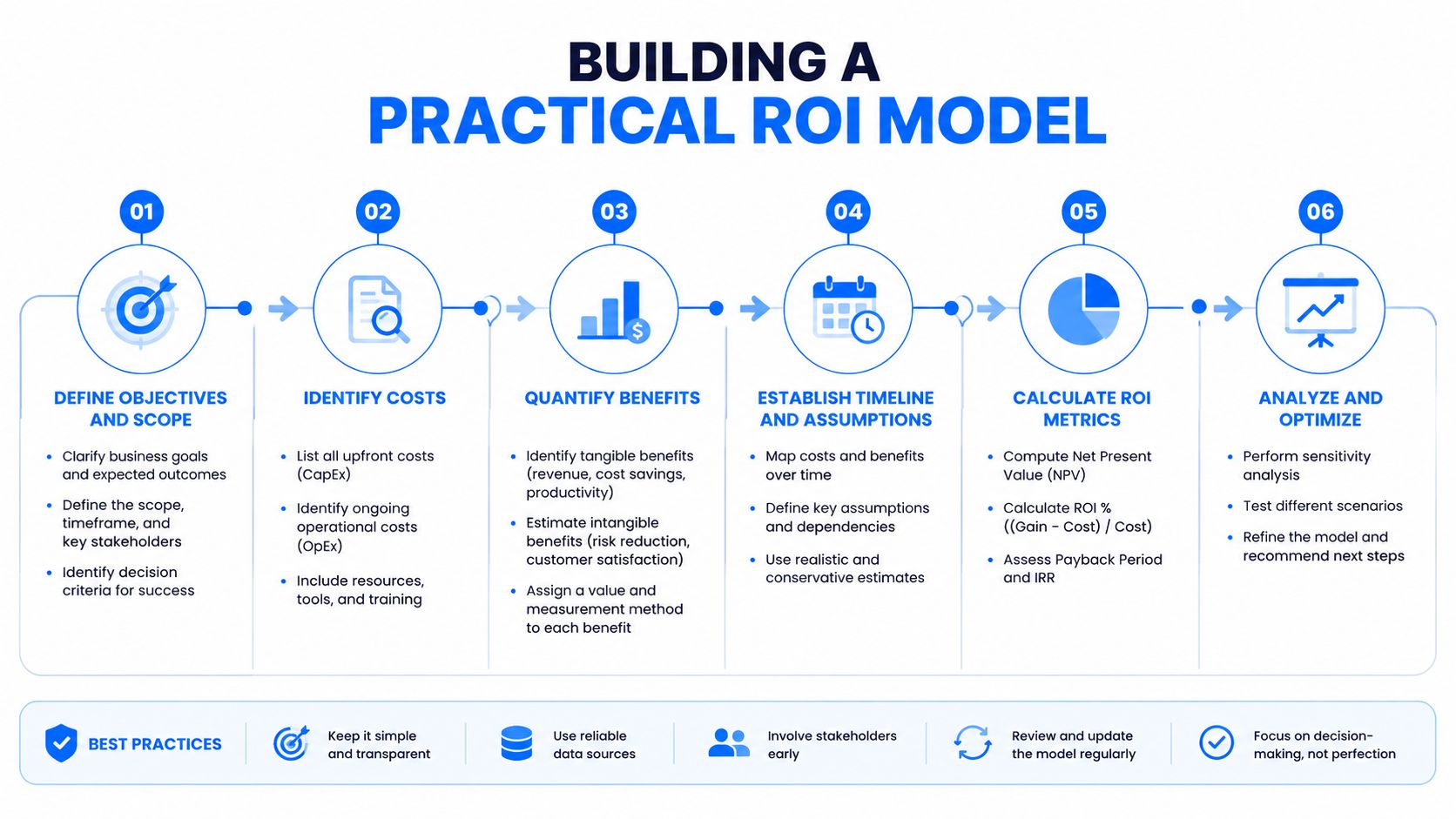
The logic is straightforward. If a tracker can measure route history, then route history becomes the benchmark for unnecessary mileage or repeated detours. If the platform captures maintenance reminders or diagnostic alerts, then those records can be compared with service costs and breakdown events over time. If tachograph automation shortens the admin process, you can compare the old record-handling workload with the new one.
Don't confuse visibility with value. A live dashboard only matters if it changes a decision or removes an avoidable task.
Monthly review is better than one-off optimism. Track the KPIs you set at the start, then separate operational changes from behavioural changes. Rescheduling idle routes is a management decision, while reducing harsh driving usually needs sustained coaching and follow-up.
For a structured view of how fleet operators can think about payback without padding the figures, the UK telematics ROI guide for fleet operators gives a useful framework. The main discipline is to keep the baseline honest, the assumptions visible and the conclusions tied to actual usage.
Common Mistakes and Governance Risks
The most common failure isn't the technology, it's the noise. If alerts are too frequent or too vague, drivers and office staff stop paying attention, and the dashboard becomes background clutter instead of an operational tool.
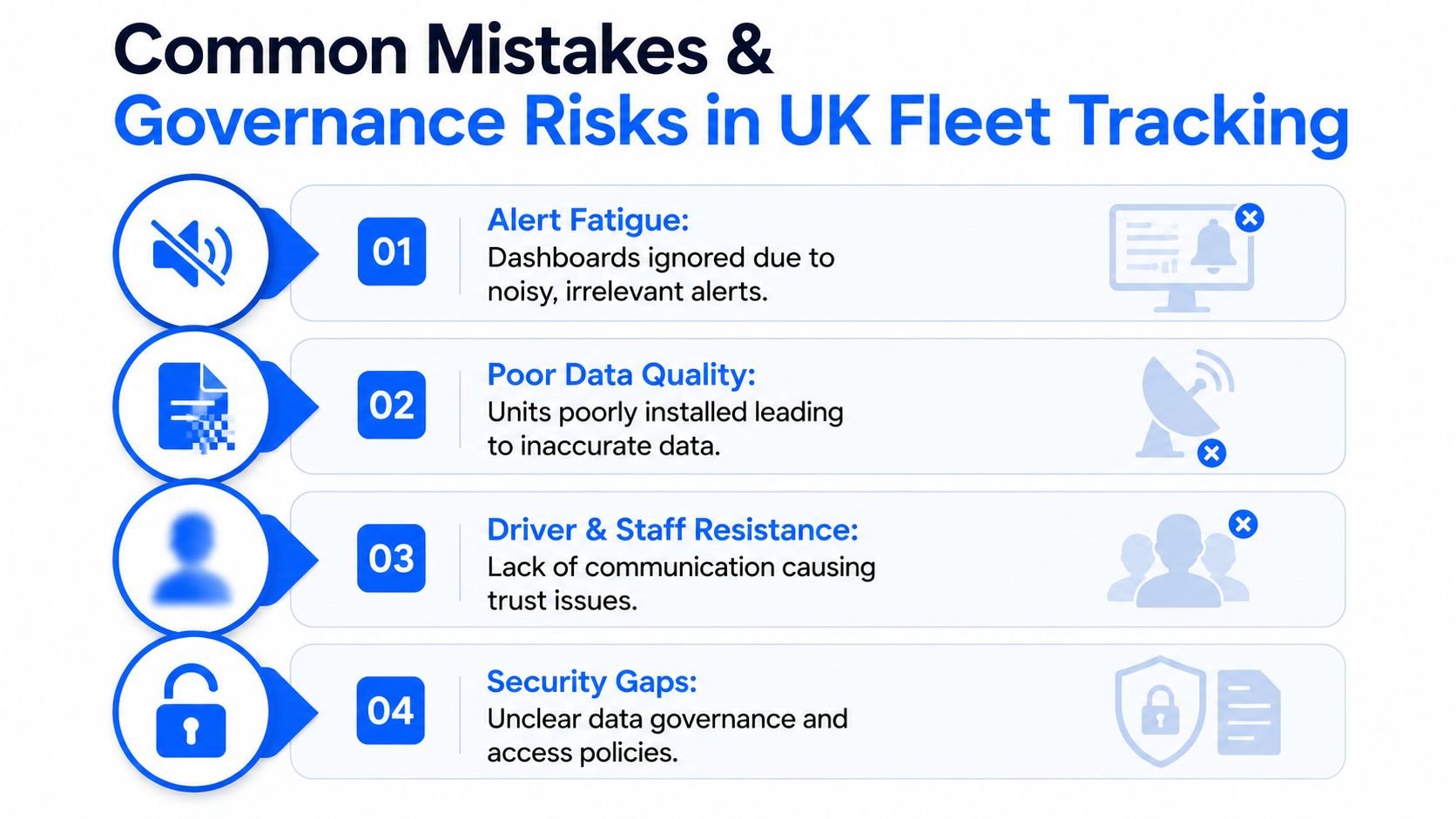
Poor data quality causes a different kind of failure. Bad fitment, shielded antennas, outdated firmware or weak installation planning can leave the office with inaccurate or incomplete records, which undermines trust very quickly. If managers can't rely on the data, they'll fall back to phone calls and guesswork.
Governance has to be explicit
The other risk is legal and cultural. Driver monitoring can cross the line into intrusive surveillance if the purpose isn't clear, the access controls are too broad, or the retention rules are vague. Transparent driver notices, limited permissions and a clear incident review process matter as much as the hardware.
Track for a documented business purpose, then use the data for that purpose only.
That also means deciding who acts on exceptions. If transport, planning and HR all assume someone else will deal with a behavioural alert, nothing gets resolved cleanly. The safest approach is to set the purpose, define the review path and keep coaching separate from discipline unless there's a clear policy basis for escalation.
Choosing a Supplier and Next Steps
A supplier comparison should start with evidence, not promises. Ask how the platform handles remote tachograph downloads under UK rules, what the camera and tracking integrations do, how data ownership works, and whether the installation and support model fits your fleet's working pattern.
What to verify
| Capability | What to verify | Fleetalyse |
|---|---|---|
| GPS tracking | Live vehicle visibility, route history, geofences and alerts | Documented on the platform for commercial fleets |
| Tachograph support | Remote downloads and compliance workflows | Supported as part of the telematics offering |
| Dashcam integration | Camera-linked incident evidence and journey context | Smart camera integration is part of the offer |
| Driver behaviour insight | Harsh events, speeding and idling visibility | Included in the commercial telematics stack |
| Mixed-fleet fitment | HGVs, vans, trailers and other assets | Built for commercial mixed fleets |
| Support and rollout | UK-based onboarding, account management and technical help | Provided as part of the service model |
Fleetalyse positions itself as a UK telematics and tracking provider for commercial fleets, with GPS tracking, remote tachograph downloads, behaviour insight and camera integration. That combination makes sense for buyers who need one platform to connect location, compliance and asset oversight without turning the business into a software project.
The next step is to take your own fleet profile, your current reporting gaps and your compliance questions into a discovery call. Trial the platform against the KPIs you already care about, then judge it on how well it fits your operating reality rather than on a sales deck.
If you're reviewing commercial vehicle tracking for an HGV, van or mixed fleet, Fleetalyse can help you connect live location, tachograph workflows and driver behaviour data in one place. Visit Fleetalyse to request a discovery call and see how the platform fits the way your fleet already works.