

A driver phones the transport office after a difficult morning on the motorway. Another vehicle has moved across the HGV's path, the driver has braked hard, and a third party is now disputing what happened. At the same time, the delivery window is closing and a compliance check needs the driver-hours record. A forward-facing camera may show the incident, but it won't automatically explain the vehicle's location, the driving event, or whether the driver had enough legal time available.
That's where an AI dashcam for HGV fleets becomes part of a wider telematics workflow rather than a standalone camera. It can combine event video with GPS, driver behaviour data and, where supported, tachograph information, giving transport managers a more useful view of what happened and what action should follow.
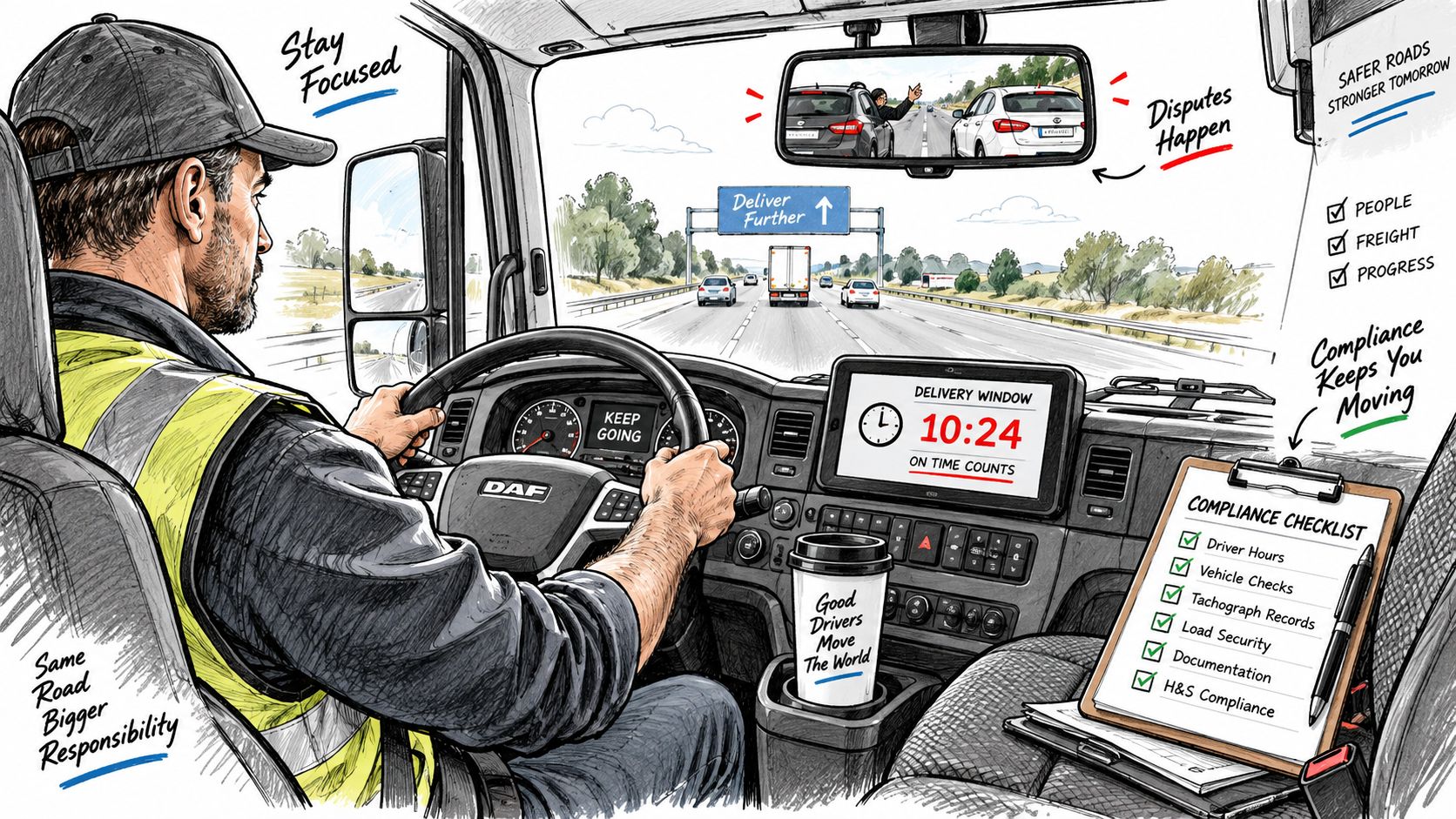
Table of Contents
- Introduction Why AI Dashcams Now Matter for HGV Fleets
- What an AI Dashcam Is and How It Works in an HGV
- Key AI Features That Matter for HGV Operations
- Compliance Evidence and Telematics Integration in Practice
- How to Choose the Right AI Dashcam for Your HGV Fleet
- Deploying AI Dashcams Responsibly Data Privacy and Driver Buy In
- Getting Value From AI Dashcams ROI and Implementation Best Practices
Introduction Why AI Dashcams Now Matter for HGV Fleets
A disputed collision can leave a transport manager checking several records at once: video, vehicle location, driver-hours data and the relevant telematics event. A connected AI dashcam for HGV fleets brings these strands closer together, so the team can assess what happened and decide what action is appropriate.
The case for connected video extends beyond accident recording. One UK insurer case study recorded claims frequency falling from 29% before installation to 8% afterwards, while average claims cost per vehicle year fell from £1,713 to £423. It also reported that overall claims reduced by 21% in the year after installation. These historical results come from one commercial transport example, so they are not a guaranteed outcome for every operator. The RSA case study shows how evidence capture and driver-risk detection can support incident handling and insurance discussions.
UK operators already recognise the value of fleet video. 74% of UK fleet operators were using in-cab or forward-facing video technology by June 2020, while later reporting found 97% of HGV fleets agreed that cameras paired with telematics were effective in reducing safety incidents. However, only about 30% of UK commercial vehicles have telematics installed, with video telematics used by fewer still, according to UK fleet safety commentary. The opportunity is to connect video with the systems transport teams already use, rather than create another isolated record.
Practical rule: A camera should help establish what happened, where it happened, which vehicle and driver were involved, and what response is suitable.
That response may involve checking live driver-hours, linking an event through the FMS, downloading tachograph records, or reviewing footage under a lawful monitoring policy. The value comes from joining evidence to the HGV workflow.
This guide is for UK haulage businesses, HGV and mixed-fleet operators, logistics teams, transport managers, planners, compliance staff and owner-drivers. It covers operation, feature selection, integration, lawful monitoring and rollout. Fleetalyse sits within fleet telematics and tracking, with smart dashcams and related integrations. It is not a transport management system, workshop platform or complete operator-licence compliance system.
What an AI Dashcam Is and How It Works in an HGV
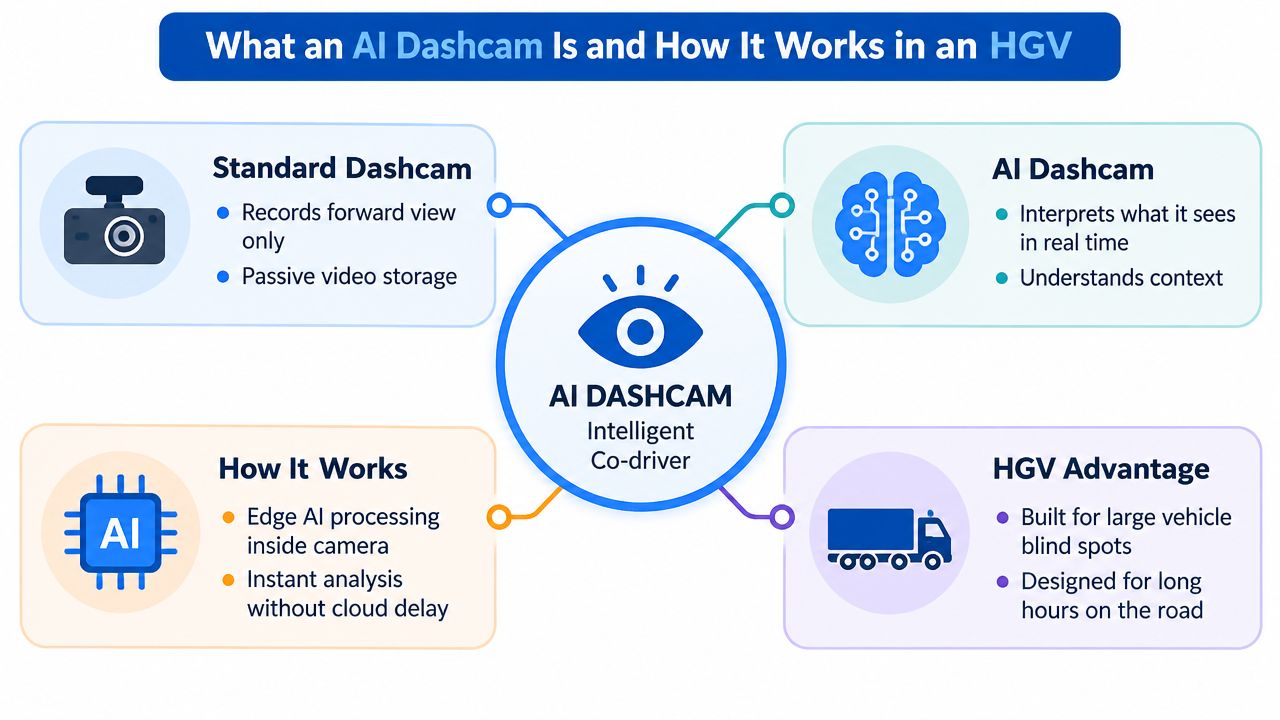
An HGV is travelling through a busy junction when another vehicle cuts across its path. A standard dashcam records the scene. An AI dashcam interprets selected events in that view, using detection models and configured rules to identify situations that need attention. It works like an extra set of eyes for the transport team, while the professional driver remains responsible for controlling the vehicle.
That difference changes what happens after an incident. With a conventional camera, someone may search through hours of stored footage after a complaint or collision. A connected AI unit can create a short event clip, attach relevant telemetry and send an alert for authorised review. It does not replace human judgement. It helps the fleet team reach the relevant moment sooner.
The hardware around the camera
An HGV installation usually begins with a road-facing camera aimed at the forward view. Depending on the system and the organisation's lawful monitoring policy, a driver-facing camera may also identify events such as distraction, mobile phone use, seatbelt non-use, fatigue or suspected impairment.
A UK industry discussion of these functions notes that a person often reviews footage before any action is taken. That safeguard matters because an automated flag is an indication for assessment, not proof of wrongdoing. The discussion of AI cameras in HGV cabs also examines the balance between safety capability, privacy and driver acceptance.
The camera uses mobile data to send event information to a cloud platform for authorised users. GPS adds location and time, while compatible vehicle connections can provide CAN bus or FMS data. This allows footage to sit alongside vehicle movement, mileage, harsh-event records and selected diagnostics. In a UK HGV workflow, those records can be considered with live driver-hours, tachograph downloads and other telematics information rather than remaining on a memory card.
Why event clips are more useful than hours of footage
A fleet generally needs context-rich evidence, not a complete recording of every mile. Triggered clips direct attention to a collision, harsh braking event, detected distraction or another configured risk. The available detections depend on the hardware, subscription and settings, so buyers should ask suppliers to demonstrate the workflow on compatible HGV equipment. They should also check how events connect with the FMS and existing telematics processes before treating the camera as a standalone safety device.
Key AI Features That Matter for HGV Operations
A useful buying test starts with the decision the system must support. After an incident, a transport manager may need to review evidence, coach a driver, identify a recurring junction risk or connect an alert with live driver-hours and existing FMS records. The right feature list follows that workflow, rather than the word “AI” on the product page.
Incident detection and evidence capture
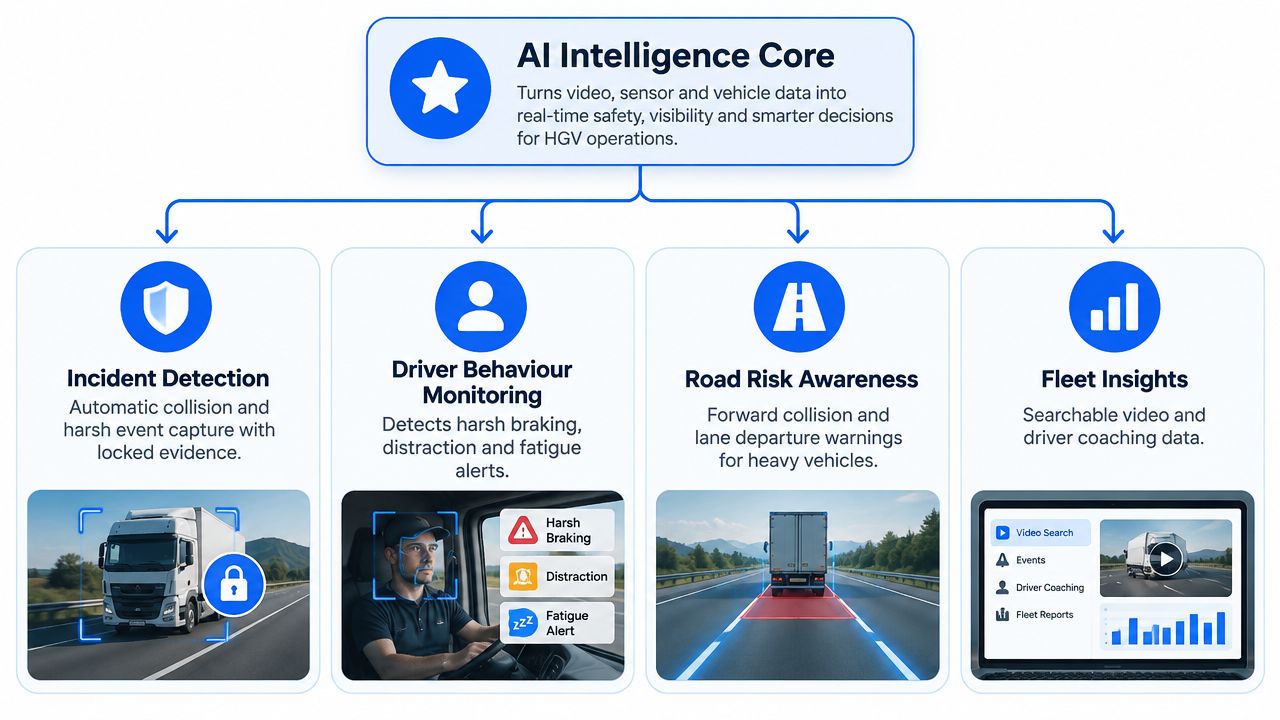
A connected dashcam can link video to harsh braking, a collision or another configured movement trigger. The claims or compliance team can then review a defined clip instead of searching through hours of recording.
For an HGV, the moments before impact often explain what happened. The forward-facing view might show a vehicle changing lane, a pedestrian entering the carriageway or the driver reacting to a developing hazard. GPS and event data add location and timing, while secure handling reduces the risk of important footage being overwritten. The result is closer to a labelled incident file than an unorganised camera archive.
Driver behaviour monitoring
Driver behaviour tools can place harsh braking, speeding and idling into reports or scorecards. A scorecard works best as a coaching aid, not an automatic disciplinary record. Reviewing the related video helps a manager separate a necessary emergency response from a repeated driving pattern.
AI monitoring may flag mobile phone use, fatigue, distraction and seatbelt non-use, along with other configured behaviours. An in-cab alert can prompt the driver immediately. Human review should then check whether the alert is accurate before coaching or further action takes place. The Fleetalyse guide to AI video analytics explains how video intelligence can form part of a wider fleet workflow.
For UK operators, that wider workflow may include tachograph downloads, live driver-hours and FMS data. A camera that cannot exchange useful event information with those processes may create another isolated dashboard for the transport office to manage.
Road-risk awareness
HGVs face blind spots, wide turning paths and congested delivery environments that car-focused camera systems may not handle well. Forward collision and lane departure warnings, object recognition and pedestrian detection can draw attention to hazards near the front and sides of the vehicle, particularly in urban deliveries, busy junctions and yards.
Calibration determines whether those warnings help. Frequent false alerts teach drivers to ignore prompts. Operators should test sensitivity, review false positives and decide whether each risk needs an immediate in-cab warning, a later coaching conversation or a route-planning change.
AI-driven driver alerts and assistance are a prominent reason fleets assess this technology. A UK fleet safety report found 69% of fleet decision-makers viewed AI-driven driver alerts and assistance as the most promising application, while 68% valued AI for telematics analysis and 65% wanted predictive accident capability. These findings are reported in UK coverage of fleet safety technology.
Compliance Evidence and Telematics Integration in Practice
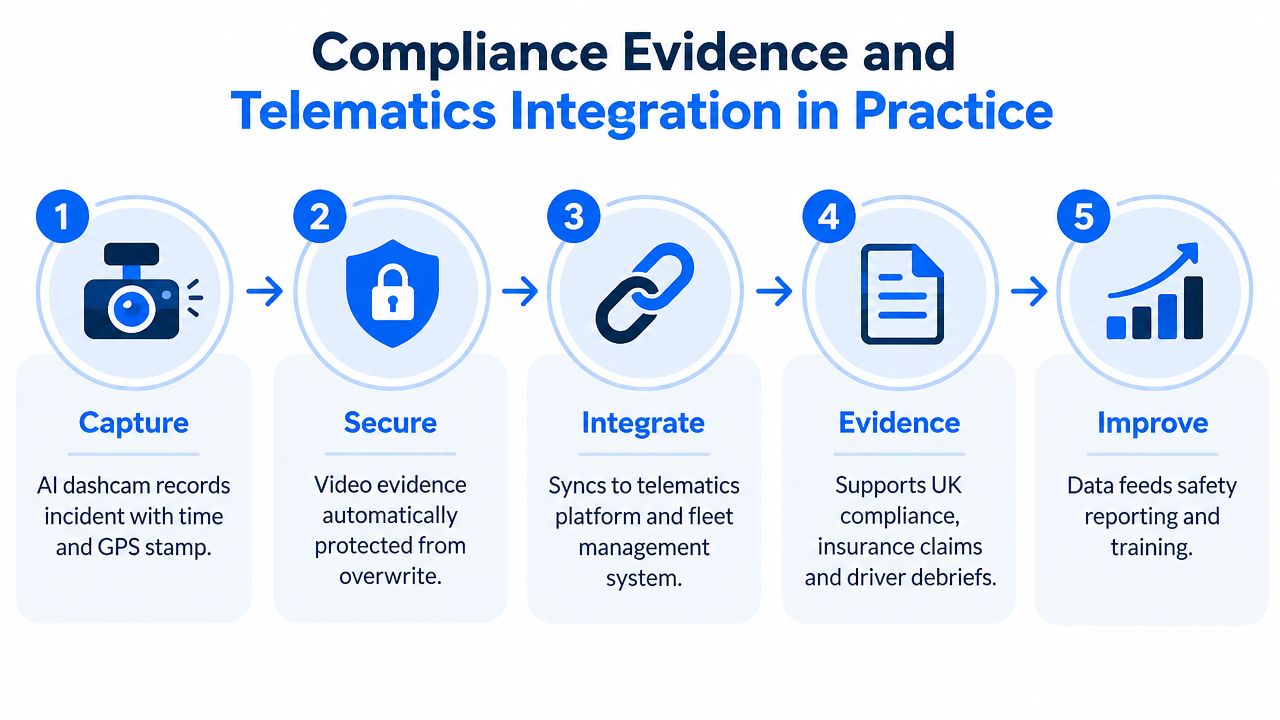
Video becomes more useful when it's placed beside the records your transport team already relies on. A disputed incident may require the clip, the vehicle's location, the route history, the event telemetry and the driver-hours context. No single data source answers every question.
GPS tracking can show where the HGV was, while geofences can identify entry and exit from depots, customer sites or restricted areas. Historical playback adds journey context, and route intelligence helps planners compare what was scheduled with what happened. Driver behaviour reporting can then identify whether the event was isolated or part of a wider pattern.
Tachograph downloads and driver-hours context
UK operators must download the digital tachograph vehicle unit at least every 90 calendar days and each driver card at least every 28 calendar days. Government guidance also says downloads should happen immediately before transferring control of a vehicle, without delay when the unit or card is malfunctioning, and whenever necessary to avoid data loss. The vehicle unit holds 365 days of average data, while the driver card holds 28 days before the oldest records are overwritten. These requirements are set out in official vehicle operator responsibilities.
Remote tachograph downloads can reduce manual handling, but they don't remove the need to interpret records properly. Government guidance states that all work, including out-of-scope driving and periods of availability, must be recorded through manual inputs on a digital or smart tachograph, or on paper where relevant. The guidance on recording other work matters when a platform presents live driver-hours visibility, because the data is only useful if the underlying working activity is complete.
Vehicle connections and maintenance information
HGV hardware may connect through an FMS cable interface or a behind-tachograph harness, depending on the vehicle and installation approach. CAN bus integration can provide fuel usage, true odometer information and selected diagnostics. That information can support utilisation reviews, fuel-related insight and maintenance reminders, but it shouldn't be confused with a full workshop management system.
A cloud dashboard and customer portal can bring these feeds together for authorised users. For background on the wider value of connecting fleet data sources, the Fleetio integration case study from Streamkap offers useful context on integration design.
| Data source | What it provides | Typical use case |
|---|---|---|
| AI dashcam | Event video, driver-risk flags and incident context | Claims review, driver debrief and safety coaching |
| GPS tracking | Position, journey history and movement information | Route review, asset visibility and geofence alerts |
| Telematics event data | Harsh events, speeding, idling and selected vehicle information | Behaviour scorecards and operational reporting |
| Tachograph data | Driver and vehicle activity records | Remote downloads, driver-hours review and audit preparation |
| CAN bus or FMS data | Fuel, mileage and selected diagnostics where compatible | Utilisation insight, fuel-related reporting and service reminders |
The practical model is a single operational picture, not a camera replacing tachograph records. Integrated GPS tracking and dashcam solutions for fleets shows how these functions can be considered together when reviewing a commercial telematics setup.
How to Choose the Right AI Dashcam for Your HGV Fleet
Start with the fleet problem, not the product brochure. A regional HGV operator may prioritise incident evidence and driver coaching, while a mixed HGV and van fleet may need one dashboard for different vehicle types. A trailer-heavy operation may place greater importance on GPS movement alerts and asset tracking than on driver-facing monitoring.
Use a must-have versus nice-to-have review before speaking to suppliers.
Must-have checks
- Road view and image quality: Confirm that the camera records the detail your claims team needs in normal operating conditions, including poor weather and low light.
- Event retrieval: Ask how a manager finds a clip, what telemetry accompanies it and how authorised users export or share evidence.
- Connectivity: Check the mobile connection model, data handling and whether the system remains useful when a vehicle has limited connectivity.
- HGV fitment: Confirm whether the unit supports an FMS cable, behind-tachograph harness or another compatible installation method.
- Telematics compatibility: Establish whether video, GPS, driver behaviour, tachograph downloads and vehicle data appear in one platform or require separate logins.
- Storage and retention: Ask how long footage is retained, what protects an incident clip from overwrite and who controls access.
Nice-to-have features
A driver-facing camera, in-cab alerts, object recognition, searchable event libraries and advanced reporting may all be valuable, but only if they match your policy and operating environment. A feature that produces frequent alerts without a coaching process can create work rather than remove it.
Commercial support matters too. Compare self-install plug-and-play hardware with clean professional fitment, check the onboarding process, and ask whether UK-based account and technical support are available. Review B2B terms carefully, including any upfront 12-month hardware charge, installation fees, subscription structure and Direct Debit arrangements. Don't assume savings, coverage or compatibility. Require each capability to be documented for your actual vehicle and service configuration.
Deploying AI Dashcams Responsibly Data Privacy and Driver Buy In
Driver acceptance isn't a soft issue. If drivers believe the camera is designed to catch them out, they may distrust alerts, challenge accurate footage and disengage from coaching. If the operator explains the purpose clearly and applies the system consistently, the same evidence can protect drivers from disputed allegations and help managers address genuine risk.
The UK Information Commissioner's Office says workplace vehicle and driver monitoring must comply with data protection law. Workers should be told what monitoring takes place, why it's needed, what information is collected, how it's used, who it's shared with and how long it's kept. Monitoring should go only as far as needed for a specific purpose such as safety or security. The relevant principles are summarised in UK tachograph and monitoring guidance.
A lower-friction rollout
- Write the policy first. Define the purpose, camera views, alert types, access rights, retention approach and review process before installation.
- Consult drivers early. Demonstrate an event clip, explain human review and invite practical feedback on alert timing and cab privacy.
- Separate coaching from punishment. Use scorecards and footage to identify patterns, then give the driver a chance to explain the context.
- Tune the system. Remove noisy alerts, review false positives and avoid sending managers every minor event.
- Control access. Limit footage access to people with a genuine operational, claims or compliance reason, and keep an audit trail where the platform supports it.
A driver-facing camera deserves a higher level of scrutiny than a road-facing view. Consider whether it's necessary for the stated safety purpose, whether less intrusive monitoring could achieve the same result and whether breaks or non-driving activity need separate treatment.
For a broader framework on responsible implementation, this practical AI governance approach from By Design Law Firm & Legal Consultancy, PLLC can help teams think through ownership, accountability and policy controls. Fleetalyse also provides a useful reference point in its guide to setting up a telematics data employee policy.
Getting Value From AI Dashcams ROI and Implementation Best Practices
A successful rollout turns event data into a repeatable management habit. Begin with a defined pilot group, fit cameras around vehicle availability, and assign responsibility for incident reviews. Establish a coaching rhythm, tune geofences and alerts, then track trends in harsh events, disputed incidents, utilisation and fuel-related behaviour.
Measure the financial case against your own baseline. The European Fleet Dashcam Report found reported improvements in safety, fewer false insurance claims and positive ROI for some fleets. It also reported insurance premium reductions and lower accident-related costs among participating users. These findings provide context, not a promise for every operator. The European Fleet Dashcam Report explains the reported results and their context.
AI dashcam value grows when it connects with the wider HGV workflow. GPS tracking, trailer and container movement alerts, remote tachograph downloads, live driver-hours, maintenance reminders, FMS integration and driver behaviour reporting should support the same operational priorities. Lawful monitoring also depends on the policy and review controls covered earlier. For planning AI adoption in business processes, the AI implementation guide from Wonderment Apps offers useful context.
Fleetalyse provides UK commercial fleets with GPS tracking, remote tachograph downloads and connected dashcams, including HGV and mixed-fleet hardware, FMS or behind-tachograph connections, cloud reporting and UK-based support. Visit Fleetalyse to review options and request a demonstration built around your vehicles, driver-hours workflow and privacy policy.
If you are assessing an AI dashcam for HGV fleets, ask for a practical demonstration using your fleet profile. Check how footage, alerts, tachograph data and FMS information fit together before committing to rollout.